
Shopify Mobile App Integration: Extending Your Store Beyond the Website with Shopify Development Services
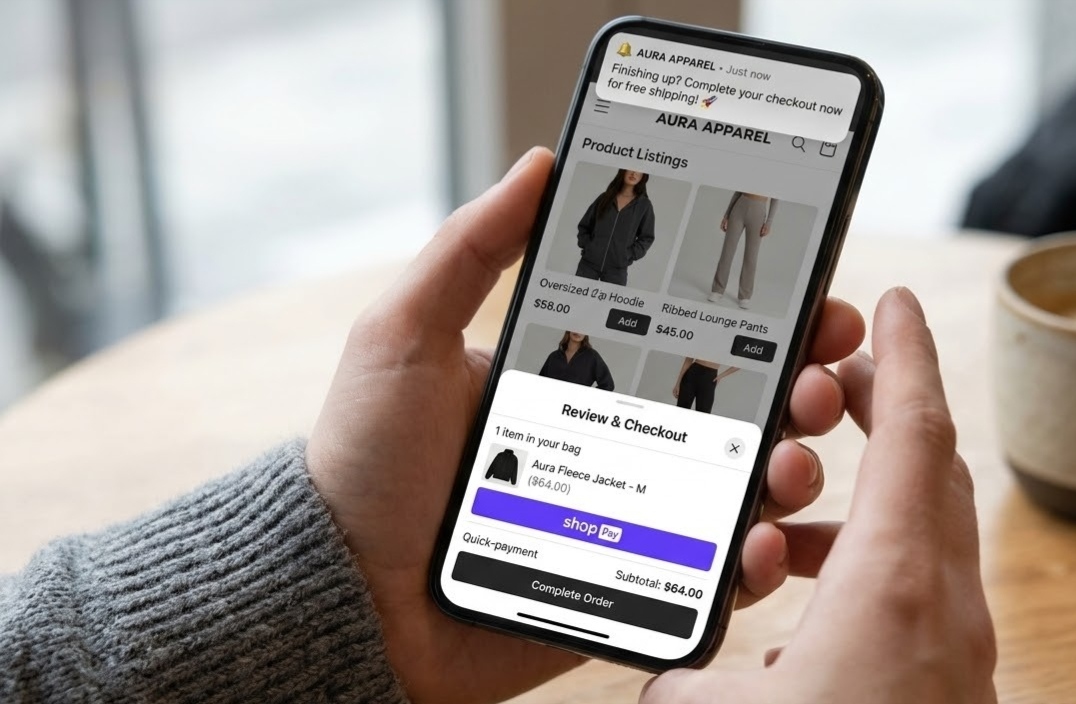
More people shop on their smartphones than ever before. Mobile commerce accounts for the vast majority of traffic in many cases, although simply having a mobile website that is compatible with smart devices does not guarantee conversions. An app will do much better as users will be able to browse faster and receive personalized messages from a product-oriented platform.
Shopify makes it happen using APIs and SDKs along with app building capabilities to connect your store to iOS and Android platforms. With the help of Shopify development services for mobile app, you will be able to create an app that is fully synchronized with your products, stock, customers and orders. In this article, we will describe the process of Shopify mobile app integration, its benefits, methods and what you should know about it.
What Is Shopify Mobile App Integration?
Integration of Shopify mobile app refers to linking your Shopify store with a native or cross-platform mobile application that will enable your customers to view products, manage their accounts, and make purchases right from their mobile phones. In this case, the Shopify store acts as the back-end of the app. All products, collections, pricing, inventory, discounts, and orders are taken from the same source, which allows you to handle everything from one place.
There are also three different things that should be separated from each other:
Official Shopify mobile app for merchants: This is an admin app that enables you to manage orders, products, and analytics from your mobile phone.
Shop App for shoppers: It is a consumer app where customers can find your stores and monitor their orders.
Your branded store app: Your custom app that bears your brand name, logo, and customer experience. This is what we are talking about in this article.
Why Your Store Should Go Beyond the Website?
A website will always be an essential part of your business, but there are many benefits to using a mobile app.
1. Increased engagement and retention
Having your app icon on your customers’ home screen makes it easy for them to tap into your brand. Customers who download your app often become regulars.
2. Push notifications
You can send your customers updates on their orders, cart abandonment reminders, new stock alerts and personalized offers. This is all done directly to their phone and doesn’t rely on them opening your email.
3. Faster experience
Mobile apps can load quickly and will remember your customers’ preferences.
4. Easy checkout
Customers can save their address, preferences and have wallet options such as Apple Pay and Google Pay meaning they can check out with just a few taps.
5. Loyalty and rewards
Customers can earn points, referrals and exclusive member offers. This can be easily implemented within your app.
6. Use device features
You can use features such as cameras, biometric logins, location and barcode scanners to create a unique experience.
7. Increased brand credibility
Having your app on the App Store and Google Play increases your credibility and gives you more ways to be discovered.
How to Connect Shopify to Your Mobile App?
There are many tools provided by Shopify to help developers create your app.
Storefront API
This GraphQL based API will give you access to products, collections, carts, customer accounts and checkout. It will help you create custom shopping experiences on any platform including mobile.
Mobile Buy SDK
Shopify offers SDKs for iOS and Android. This will help you create native apps with ease. They include features such as product retrieval, cart management and checkout initiation.
Admin API
If you need to do anything in your back office, you can securely access your orders, stock, customers and fulfilment information. This is usually used by your own systems.
Webhooks
These will let you know when something has changed in real time. This could be a new order, stock update or shipped items. This will keep your app up to date and allows you to send push notifications.
Headless
This means your app (or website) is your front end and Shopify will be your back end. This gives you complete freedom to create your app.
How to Create a Shopify Mobile App?
There is no one ‘right’ way to create your app. It depends on your budget, time frame and how unique you want your app to be.
App Builders
There are many third-party tools available that will help you create a mobile app from your Shopify store with little to no coding. This is a quick and cost-effective option which is popular with small and growing brands. However, you will have fewer customisation options and will have to pay for a subscription.
Cross-Platform
Using a framework such as React Native or Flutter will help you create one code base for both iOS and Android. This will keep your costs and time frame to a minimum.
Fully Native
Creating separate apps using Swift (iOS) and Kotlin (Android) will give you the best performance and full access to all the features on your device. This will cost more and take longer but is a good option if you have high requirements.
Progressive Web App (PWA)
This is essentially a web app that behaves like a mobile app. It allows customers to use your app offline and can be added to their home screen. This is a cost-effective option but will have fewer features.
Features to Include in Your Store App:
- Your app should have features that will help your customers shop more easily.
- Easy to navigate with search, filters, sorting and collections.
- Quick and secure checkout with saved information and digital wallets.
- Customer account with order history, wishlists and saved addresses.
- Push notifications for orders, offers, new stock and cart reminders.
- Loyalty and rewards.
- Live stock updates so customers can see what is available.
- Product reviews and ratings.
- Deep linking to allow customers to click through to specific products from emails, ads and social media.
- Analytics.
- Things to Consider
While integrating a mobile app can give great results, there are a few things to consider:
- Costs to develop and maintain- Apps will need to be updated regularly to keep up with new OS and devices.
- App Store Approval- Apple and Google have their own guidelines to follow. This can cause delays.
- Consistency- Your app, website and other channels should have consistent pricing, stock and content.
- Performance- If your app is slow to load or crashes you’ll get bad reviews.
- Security- You need to ensure your customers’ data and payments are secure with secure authentication and API.
- Adoption- If your customers aren’t downloading your app it won’t be of any value. You will need a promotion strategy.
Why Use a Professional Shopify Development Service?
App builders can be a good starting point but often growing brands will want a more in-depth and reliable solution. Using a professional Shopify development service will help you plan, create and scale your mobile app to help your business.
An experienced team will work with you to understand your customers, products and processes. They will then advise on the best architecture to use. They will also create an intuitive design, connect your app to Shopify using the right APIs and thoroughly test your app across devices. Once live they can also monitor your performance, fix any issues and add new features.
Using professionals will give you:
- Customised design and features.
- Easy to integrate with your ERP, CRM, loyalty and shipping tools.
- Improved performance, security and scalability.
- Help with app store submissions.
- Maintenance.
Overall, using experts will save you time, reduce risk and give you a real return on investment.
Best Practice
- Define your goals– Are you looking to increase repeat purchases? Engagement? Or brand presence? Make sure you measure your results.
- Keep it simple- Keep your app easy to navigate with a clean design and easy to use buttons.
- Optimise– Compress your images, keep requests to a minimum and test on slower connections.
- Personalise- Use purchase history and preferences to recommend relevant products.
- Use push notifications wisely– Make sure they are useful and don’t become annoying.
- Test– Test your app across different devices, screen sizes and OS.
- Promote- Use your website, emails, social media and packaging to encourage downloads. Offer an incentive for first-time purchases on your app.
- Listen- Regularly check your app store reviews and analytics. Release updates based on what your customers are saying.
Conclusion
While your website is the core of your store, a mobile app will help you reach your customers where they spend the majority of their time. Using Shopify’s APIs, SDKs and flexible options you can create a mobile app that will provide your customers with a faster shopping experience, personal communication and increased loyalty.
Choosing the right option for your goals and budget and considering performance, security and long-term growth will help you create a high quality, reliable and scalable app. Partnering with an experienced Shopify development service is one of the smartest investments you can make. By expanding your store outside of your website you will have more opportunities to build long-term relationships with your customers.
FAQ
1. What is Shopify mobile app integration?
This is the process of connecting your Shopify store to your mobile app. This will keep your products, stock, customers and orders all in sync. Customers can now browse and purchase from their phone.
2. Does Shopify have a mobile app?
Shopify does have a mobile app called Shop. This helps customers find stores and track their orders. To have your own branded experience you will need a custom or app-builder store app that connects to your Shopify store.
3. How much does it cost to build a Shopify mobile app?
Costs can vary greatly. App builders will usually charge a monthly fee. Custom cross-platform or native apps will be charged per project. This will depend on the features, design and integrations required.
4. How long does it take to create a Shopify store app?
App builders can be created in a few weeks. Custom apps can often take between 2-4 months or longer.
5. Will my app be in sync with my Shopify store?
Yes. As your app connects to Shopify via the APIs any changes to your products, prices and stock will be shown on your app. Any orders placed will show in your Shopify dashboard.
6. Do I need a mobile app if my website is mobile-friendly?
Not always. If you have a smaller store a responsive website may be enough. However, if you have regular customers, frequent purchases or want to communicate directly with your customers using push notifications then an app will be valuable.
7. Can I use push notifications with my Shopify app?
Yes. Most app solutions will have push notifications. You can send your customers updates on their order, cart abandonment, promotions and new stock alerts.
8. When should I use a Shopify development service for my app?
If you need custom features, integration with other systems, improved performance and security then using a professional Shopify development service would be a good idea.

Neetu Wadhwa is the Director of Bloom Agency, a Mumbai-based full-service digital marketing and web development company. With a strong focus on performance, innovation, and strategy, she leads the agency in delivering SEO, web design, and growth marketing solutions that drive measurable business outcomes.





Rahul M.
B2B Service Provider