
An SEO audit can end up showing dozens or even hundreds of issues messing with a website’s organic search performance. These findings might cover broken links, pages that load slowly, duplicate content, indexing troubles, metadata that’s missing, weak internal linking, plus landing pages that simply do n’t pull their weight. Sure, every problem deserves attention, but trying to fix everything all at once can end up wasting time, stretching resources, and pushing back real improvements way too long.
The real trick in a successful audit isn’t only spotting what’s wrong. It’s figuring out which things should be tackled first, based on likely impact to search visibility, overall site usability, conversions, and the business goals that are actually on the table.
A more structured way to prioritise helps marketing teams keep their effort on what matters most. With professional SEO audit services, companies can learn the underlying causes of the performance decline, split urgent faults from minor suggestions ( kind of ), and build a workable roadmap for sustainable organic growth.
Why Prioritising SEO Audit Findings Matters
Not every SEO issue has the same level of importance. A page blocked from indexing may prevent valuable content from appearing in search results, while a missing image alt attribute on a low-traffic page may have a much smaller immediate impact.
Treating both issues equally can lead to inefficient resource allocation. Teams may spend time correcting minor technical details while significant problems continue to affect important landing pages.
Prioritisation helps businesses:
- Address technical problems that prevent search engines from accessing or indexing valuable pages.
- Improve the performance of pages that attract relevant organic traffic and leads.
- Resolve issues affecting important user journeys and conversions.
- Allocate development, content, and marketing resources more effectively.
- Measure progress through clearly defined goals and performance indicators.
The objective is to create a clear connection between SEO recommendations and business outcomes rather than completing a checklist without considering the results.
1. Identify Issues That Prevent Crawling and Indexing
Crawling and indexing problems should usually get early attention, because they can stop important pages from showing up in search results . Search engines kinda have to find and access a page first, then they can assess it for inclusion in their indexes, if that step doesn’t happen, later optimisation may feel a bit pointless or deliver limited gains until the root issue is fixed.
During an audit, you’ll want to check the website robots.txt file, the XML sitemap, indexability directives, canonical tags, HTTP status codes, and the URL inspection data inside Google Search Console. Really take a look, not just skim it.
Try to spot key pages returning errors like 404 , or 5xx responses, pages that are blocked due to wrong directives , and canonical tags that point to irrelevant URLs. Also confirm whether valuable pages are missing from the XML sitemap, and whether redirected URLs are being included too, like unnecessarily.
How to prioritise: First fix indexing and crawling problems that impact revenue generating service pages, crucial category pages, and high value content. Only then move on to similar issues on less important URLs.
For example , if a sites main service page is accidentally set with a noindex directive, fixing that should come first, before you do small metadata improvements across the blog.
2. Resolve Critical Technical SEO Errors
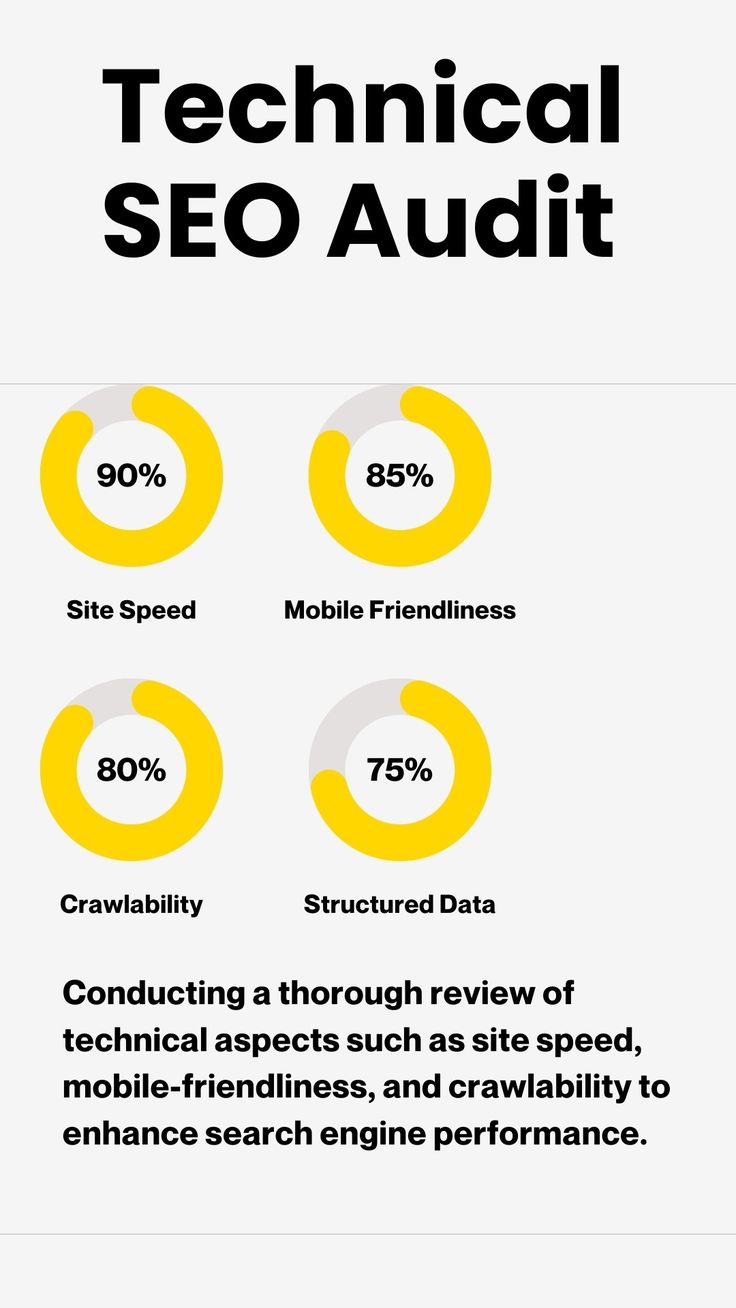
Technical SEO problems can affect how search engines access, interpret, and process a website, but also things can look worse in an audit report then they really are. So, you should really judge technical findings based on their actual consequences not just because they appear in some neat list somewhere.
Common stuff like broken internal links , redirect chains, redirect loops, server errors, incorrect canonical tags, duplicate URL variations , and navigation that’s just not right can all show up. Still, one issue is not the same as another, and the impact matters more than the label.
For example, a broken internal link that points to an important service page can mess with both crawling and the user journey, kind of same time. Meanwhile, a redirect loop can make a page feel like it simply does not exist, and inconsistent canonical signals can create this awkward confusion about which URL is supposed to be the preferred version.
So review the affected URLs, figure out the root cause, and check if it hits multiple pages, or it’s basically the whole website behaving weird.
How to prioritise, start with the errors that make important pages inaccessible, weaken internal navigation, or create problems across many sections. Then deal with isolated, lower-impact issues later unless they touch a critical customer journey.
That way teams do not treat every single warning like an emergency, and developers can focus on fixes that have measurable value instead of chasing every red flag.
3. Prioritise Pages With the Highest Business Value
One of the most effective ways to rank SEO findings is to connect them with business objectives. A website may contain thousands of URLs, but only a portion may directly support sales, enquiries, registrations, or other conversions.
For a service business, high-value pages may include service landing pages, industry-specific pages, pricing pages, and contact pages. For an ecommerce website, important URLs may include category pages and product pages that contribute significantly to revenue.
Use analytics, Google Search Console, conversion tracking, and internal business data to understand which pages attract relevant visitors and contribute to outcomes.
Then evaluate audit findings affecting those pages. For example, a slow-loading landing page generating qualified leads may deserve more attention than an outdated article receiving very little relevant traffic.
How to prioritise: Consider organic traffic, conversion contribution, commercial intent, strategic importance, and the severity of the issue together.
A page with modest traffic but strong conversion potential can still deserve high priority. The aim is to improve the pages that matter to the business, not simply the pages with the highest visitor counts.
4. Fix Content Problems Based on Search Intent
Content audits frequently identify thin pages, outdated information, keyword overlap, duplicate content, weak headings, and pages that fail to answer users’ questions.
However, deleting or rewriting content simply because an SEO tool flags it can be counterproductive. Every page should be evaluated according to its purpose, search intent, performance, and value to the audience.
Begin by identifying pages that target important keywords but receive few impressions or clicks. Compare their content with the questions users are asking and the intent reflected in relevant search results.
Look for missing information, unclear explanations, outdated facts, weak differentiation, and a lack of useful next steps. Also identify pages competing for the same search intent where consolidating content may create a stronger resource.
How to prioritise: Improve commercially important pages with weak content, pages showing declining performance, and pages with clear gaps between user intent and the information provided.
For example, a service page targeting customers who are ready to enquire should explain the service, its benefits, the process, and how to get started. A general educational article may need a different content structure because its purpose is to answer informational questions.
Content improvements should increase usefulness and clarity rather than simply adding more words or repeating keywords.
5. Address Page Speed and Core Web Vitals Issues
Website speed influences user experience, particularly when visitors browse on mobile devices or use slower connections. Performance issues can make pages frustrating to use and may contribute to abandonment during important conversion steps.
An audit may identify large images, render-blocking resources, excessive JavaScript, inefficient caching, or layout instability. Core Web Vitals provide specific measurements of loading performance, responsiveness, and visual stability.
The principal metrics are:
- Largest Contentful Paint (LCP): Measures how quickly the main content becomes visible. A good result is 2.5 seconds or less.
- Interaction to Next Paint (INP): Measures responsiveness to user interactions. A good result is 200 milliseconds or less.
- Cumulative Layout Shift (CLS): Measures unexpected layout movement. A good result is 0.1 or less.
These thresholds are assessed at the 75th percentile of page visits, where sufficient field data is available.
Use Google PageSpeed Insights, Search Console’s Core Web Vitals report, and relevant diagnostic tools to investigate performance problems.
How to prioritise: Focus on high-traffic landing pages, pages with conversion forms, and templates with performance problems affecting many URLs. Fixing a shared template issue may improve several pages at once.
Avoid making performance changes based only on laboratory scores. Validate improvements using real-user data where available and confirm that functionality remains intact.
6. Improve Internal Linking and Website Structure
Internal links help visitors navigate a website and help search engines discover relationships between pages. Poor internal linking can leave valuable content difficult to find or reduce its prominence within the site’s structure.
Audit findings may include orphan pages, broken internal links, excessive clicks required to reach important pages, and weak connections between related content.
Start by identifying valuable pages with few relevant internal links. Then review whether links from related articles, service pages, category pages, and navigation elements can help users discover them more naturally.
For example, a blog explaining technical SEO issues could link to a relevant technical SEO service page when the link provides genuine value to readers.
How to prioritise: Give preference to internal linking improvements that help users reach important services, strengthen relevant topic relationships, and make valuable pages easier to discover.
Avoid adding links indiscriminately or forcing exact-match anchor text into every paragraph. Internal links should make sense within the content and help visitors understand where a link will take them.
7. Evaluate Backlink and Off-Page SEO Issues Carefully

Backlinks can contribute to a website’s authority and search visibility, but backlink audit findings require careful interpretation. A large number of unfamiliar or low-quality links does not automatically mean that a website has a penalty or needs to disavow links.
Review referring domains, link relevance, unusual acquisition patterns, and any available evidence of manipulative link-building activity. Consider whether there is a known manual action or a clear reason to investigate a specific group of links.
Do not disavow backlinks solely because an SEO tool assigns them a low quality score. Google’s guidance generally recommends using the disavow tool cautiously, particularly when there is evidence of substantial unnatural linking that may lead to a manual action.
How to prioritise: Investigate clear signs of manipulative link activity, relevant manual actions, and issues with a credible risk of affecting search performance. Routine backlink monitoring and legitimate relationship-building can be handled as part of the ongoing SEO plan.
The focus should remain on earning relevant editorial links, publishing useful resources, and building genuine relationships with credible websites.
8. Use a Priority Scoring System for Audit Findings
A scoring system can help marketing teams compare findings objectively and communicate why particular tasks should be completed first.
One practical approach is to score each issue across four dimensionsYou can rate impact, reach, and urgency on a scale of 1 to 5, where 5 represents the greatest concern. Estimate effort separately, because a high-impact issue may still require additional planning or development support.
A simple prioritisation score could be calculated as:
Priority Score = Impact × Reach × Urgency ÷ Effort
For this model, use a consistent effort scale where 1 means very little work and 5 means substantial work. The resulting score is a planning aid, not a guaranteed prediction of ranking improvements.
For example, fixing a broken link across an important website template may score highly because it affects many pages and requires little effort. A complex redesign of a low-traffic page may receive a lower immediate priority.
Always apply professional judgement. Security problems, widespread server errors, and critical indexing failures may need immediate action even if a scoring formula does not rank them first.
9. Create an Action Plan With Clear Ownership
An audit becomes useful when the findings get turned into specific tasks, not just some high level ideas. So recommendations like “improve technical SEO” can be a little too broad , hard to implement and honestly kind of impossible to measure properly.
Each task should kinda spell it out, the problem we’re seeing, which URLs are impacted, what exact fix is being proposed, and why the business should care. Also name the responsible person, estimate the effort, and describe the expected outcome. Without that, it turns into vague work that nobody can verify later.
For instance, a task might say that a set of key service pages has incorrect canonical tags. Then list the actual URLs, assign the changes to a developer , and require a confirmation step after deployment, like “verify in staging and then again after release”.
Make sure responsibilities match the nature of the work. Technical issues usually land with developers. Content gaps might need writers or subject-matter experts. Tracking issues are often for analytics specialists and whoever owns reporting.
And don’t forget , keep one shared task tracker for everything. Teams should be able to watch progress in real time, note blockers, and confirm that completed fixes were actually implemented correctly , not just “done” in a ticket.
10. Measure the Impact of Completed Fixes
Fixing a problem doesn’t, by itself, always mean better rankings or more conversions. Search engines do need time to recrawl and re check what changed, and even then the rankings might move around because of competition, demand, seasonality and… other updates happening on other sites too.
Before you do big changes, try to log the baseline performance where you can. Depending on what the issue is, that can include indexation status, organic clicks impressions rankings, page speed, conversion rates, or technical error counts.
Once the update is done, directly check the fix. Use Search Console, analytics tools, crawling systems, and performance reporting to see if the intended change actually took effect or not.
Then compare results over a sensible time window and dig into anything unexpected. For instance, a technical adjustment can clear up crawling errors but still need extra content refinements before organic traffic starts to grow.
Keeping track continuously helps a business figure out which fixes really delivered meaningful outcomes, and where more fine-tuning is still needed.
How Bloom Agency Can Help Prioritise SEO Audit Findings
Running an SEO audit can feel kinda hard, especially if the site has tons of technical trouble, hundreds of content pages, and a lot going on with the business. Having a more structured audit process can turn all those findings into something actually actionable… not just a long list, y’know.
Bloom Agency’s SEO audit services can help businesses check technical SEO, on-page optimisation, website structure, content quality, indexing, and other stuff that affects how well a site shows up in organic search.
Instead of treating every warning like it is equally important, the point is to spot the problems that really connect with the website’s aims and then map out a workable order for fixing them. That way, businesses can coordinate technical teams easier, improve the most meaningful landing pages, and track progress in a more reliable way.
A prioritised SEO roadmap also gives a steadier foundation for ongoing improvements. Businesses can go back, review what’s been done, spot new concerns as they appear, and adjust the strategy when both search performance and business needs change.
Conclusion
Prioritising the SEO audit findings is basically what makes the website analysis turn into measurable improvement. The strongest method looks at technical severity, which pages are affected, the business value, search intent, how hard it is to implement, and the possible effect on user experience.
Start by fixing the critical crawling and indexing problems first, then move to technical errors that are hitting pages that matter. After that, improve content, performance, internal linking, and backlink practices based on relevance and the likely impact. Finally, assign ownership, confirm the fixes are really done, and measure results against a clear baseline.
With a structured process and professional SEO audit services, businesses can spend their resources on the changes that are most likely to support better website performance, stronger search visibility, and sustainable organic growth.
Frequently Asked Questions
1. What should be fixed first after an SEO audit?
Start with issues that prevent important pages from being crawled, indexed, or accessed. Then prioritise critical technical errors, problems affecting high-value landing pages, and issues that interfere with conversions or user experience.
2. How do I decide which SEO issues are most important?
Evaluate each issue according to its potential impact, the number and importance of affected pages, urgency, and implementation effort. Consider business goals and conversion value rather than relying only on automated tool scores.
3. How often should a website undergo an SEO audit?
The frequency depends on website size, technical complexity, publishing activity, and how often the site changes. Many businesses benefit from a comprehensive audit periodically and smaller technical checks on an ongoing basis, particularly after significant website updates.
4. Can fixing technical SEO issues improve rankings?
Resolving technical issues can help search engines access and understand important pages. However, ranking improvements are not guaranteed because results also depend on content relevance, competition, website authority, search intent, and other factors.
5. What tools can help prioritise SEO audit findings?
Google Search Console, Google Analytics, Google PageSpeed Insights, and website crawling tools can help identify problems and measure performance. The best results come from combining tool data with business priorities and manual review.
6. Should low-priority SEO issues be ignored?
Not necessarily. Low-priority issues can be scheduled for later, monitored, or addressed when related work is already planned. Prioritisation helps determine timing; it does not mean every smaller issue is permanently irrelevant.
7. How can SEO audit services benefit a business?
SEO audit services help identify technical barriers, content weaknesses, indexing problems, and optimisation opportunities. A structured action plan makes it easier to allocate resources, track completed fixes, and focus on improvements aligned with business goals.
8. How long does it take to see results after fixing SEO issues?
The timeline varies depending on the type of issue, the size of the website, how quickly search engines recrawl updated pages, and the competitiveness of the target searches. Technical corrections may be verified quickly, while measurable ranking or traffic changes can take longer.

Neetu Wadhwa is the Director of Bloom Agency, a Mumbai-based full-service digital marketing and web development company. With a strong focus on performance, innovation, and strategy, she leads the agency in delivering SEO, web design, and growth marketing solutions that drive measurable business outcomes.






Rahul M.
B2B Service Provider